Nous utilisons des cookies de mesure d’audience afin d’améliorer votre expérience utilisateur. Vous pouvez accepter ou refuser ces cookies à tout moment. Pour en savoir plus, consultez notre page Mentions légales & Politiques de protection des données.
To efficiently manage your data, we recommend using dedicated S3 client software instead of the Tasq integrated file manager. External clients allow for:
Uploading and downloading files larger than 5GB.
Synchronizing local and remote (bucket) folders.
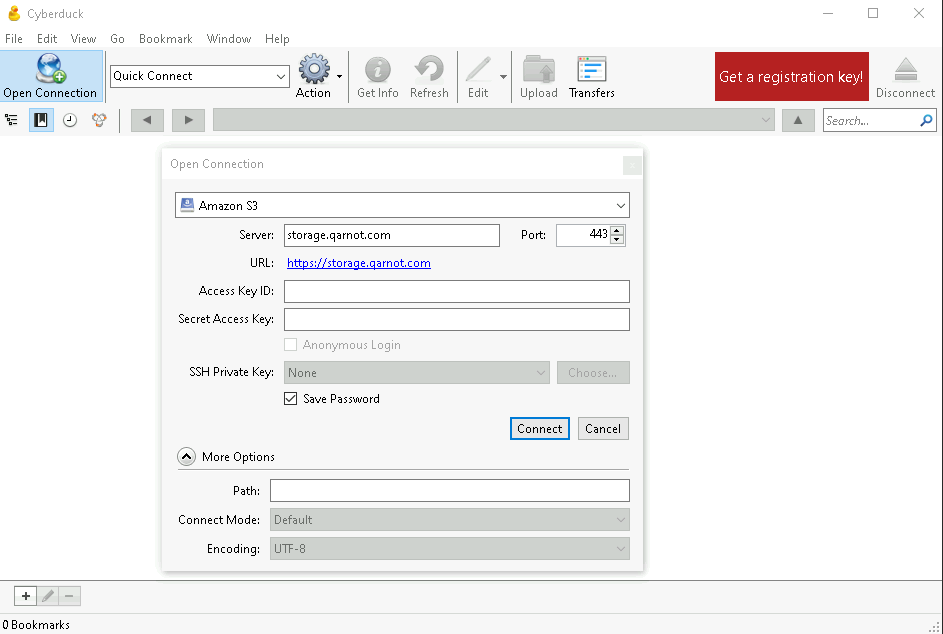
This document provides instructions for configuring three popular S3 clients: S3 Browser, Cyberduck, and rclone (with Web UI).
Cyberduck
Cyberduck is only compatible with windows and macos, if you use linux please use rclone.