
Home
Getting started
Bring your software with Docker
Core concepts
How-to guides
Monitor and debugging
Developer tools
Glossary
Documentation HPCPlease ensure your Qarnot Container Registry is activated and contains container images
To use a container image stored on your Qarnot Container Registry in a task, start by selecting one of the profiles compatible with off-the-shelf Docker images.
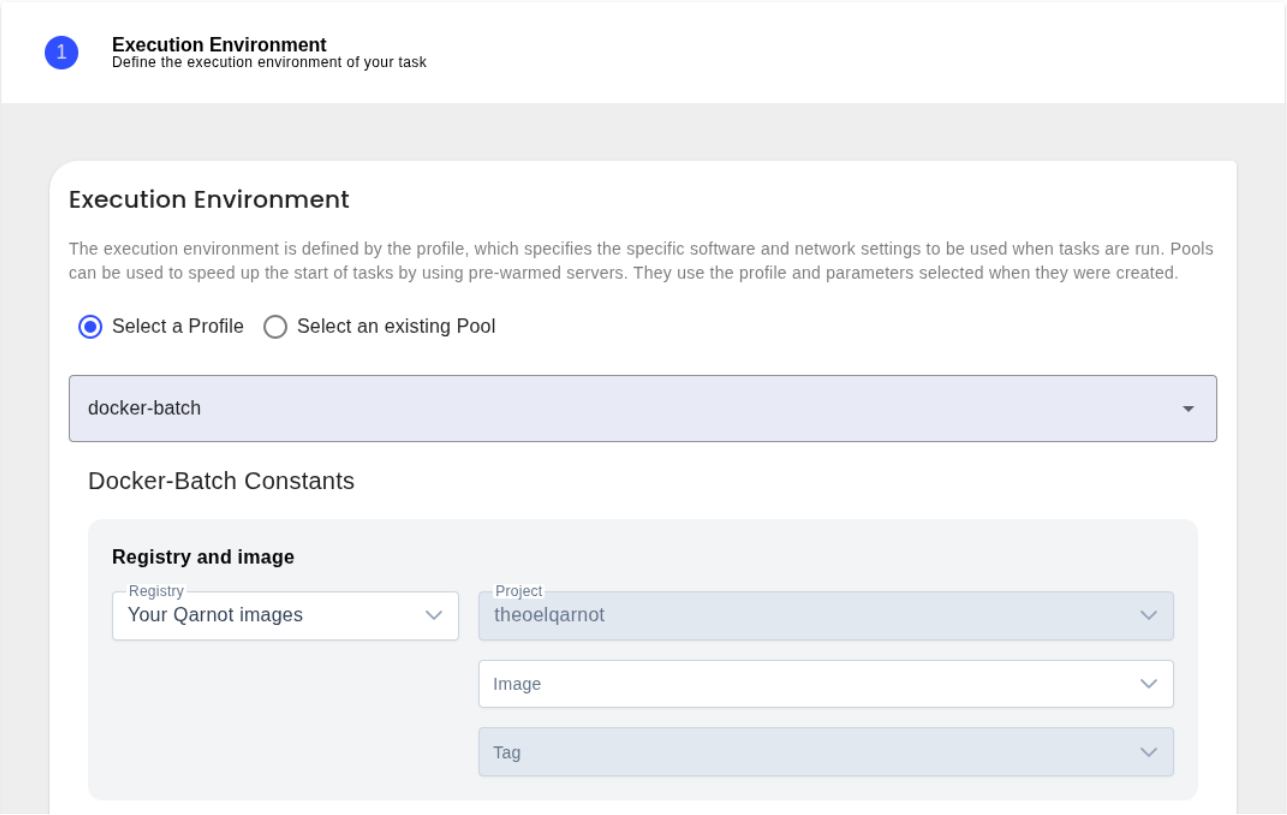
You need to define the following constants in your task configuration to point to Qarnot Container Registry
Images stored on Qarnot Container Registry are private. The login and passwords will be automatically filled for you. Your password will be set as a secret to keep it hidden in logs or API responses.
You can access / change your token from the access token page on Tasq.
Learn how to launch a task with your custom image with our guided tutorial.
Once the task configuration is properly set, the Qarnot platform will authenticate to the container registry using the credentials and pull the specified image (my-app:latest) to execute the task.
Once the task configuration is properly set, the Qarnot platform will authenticate to the container registry using the provided credentials and pull the specified image (my-app:latest) to execute the task.
Here is a full example of how to use an image stored on Qarnot Containers Registry using Qarnot's Python SDK o CLI.
Using Python SDK
import qarnot

conn = qarnot.connection.Connection(client_token='<<<MY_SECRET_TOKEN>>>')

task = conn.create_task('My Image on Qarnot Container Registry', 'docker-batch', 1)

task.constants['DOCKER_SRV'] ='https://containers.qarnot.com'
task.constants['DOCKER_REPO'] = '[qarnot_registry_id]/my-app'
task.constants['DOCKER_TAG'] = 'latest'
task.constants['DOCKER_CMD'] = 'Your Command'
task.constants['DOCKER_REGISTRY_LOGIN'] = '[your qarnot username]'
task.constants['DOCKER_REGISTRY_PASSWORD'] = '${QARNOT_SECRET__DOCKER_REGISTRY_PASSWORD}'
task.constants['QARNOT_SECRET__DOCKER_REGISTRY_PASSWORD']='your registry key stored as a secret'

task.run()

print(task.stdout())
Qarnot CLI example
#!/bin/bash

export QARNOT_CLIENT_TOKEN=<MY_SECRET_TOKEN>

qarnot task create \
  --name 'My Image on Qarnot Container Registry' \
  --profile 'docker-batch' \
  --instance 1 \
  --constants DOCKER_SRV='https://containers.qarnot.com' \
  --constants DOCKER_REPO='[qarnot_registry_id]/my-app' \
  --constants DOCKER_TAG='latest' \
  --constants DOCKER_CMD= 'Your Command' \
  --constants DOCKER_REGISTRY_LOGIN= '[your qarnot username]' \
  --constants DOCKER_REGISTRY_PASSWORD='${QARNOT_SECRET__DOCKER_REGISTRY_PASSWORD}' \
  --constants QARNOT_SECRET__DOCKER_REGISTRY_PASSWORD = 'your registry key stored as a secret'
To start using docker images on Qarnot please read the following guides